

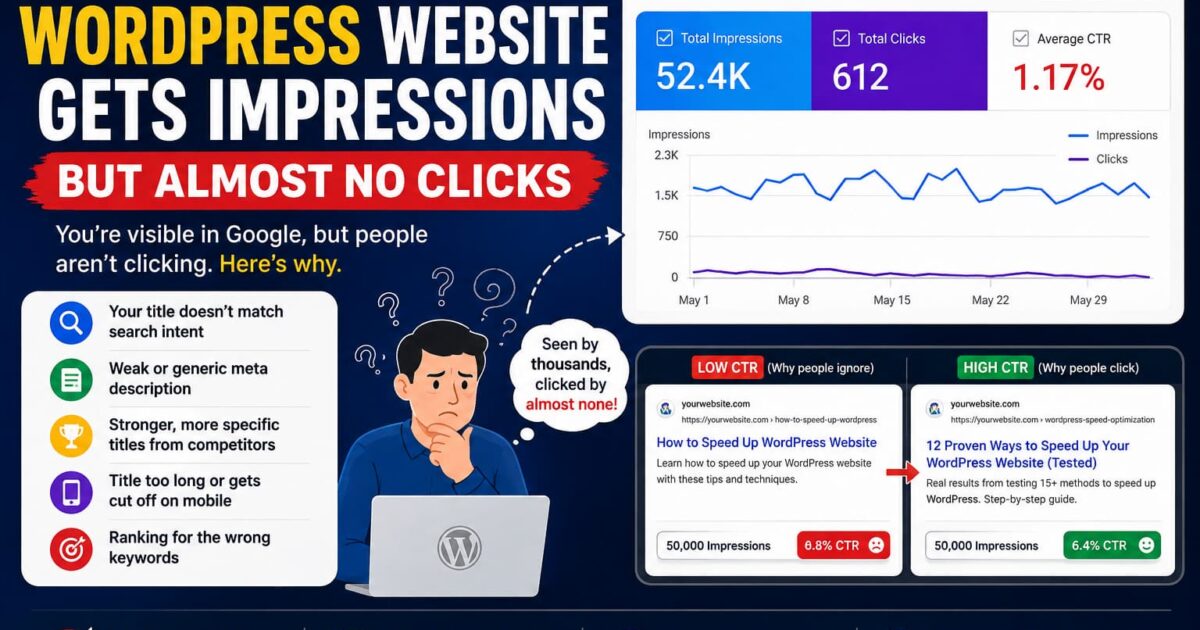
You open Google Search Console and see something that looks encouraging:
Impressions: 50,000
Then you look at:
Clicks: 600
You start wondering:
“If Google is showing my website thousands of times, why aren’t people clicking it?”
This is one of the most frustrating problems in SEO.
Your pages are appearing in Google search results. Google is discovering your content. Your website may even rank on the first page for some keywords.
But the traffic doesn’t follow.
The important thing to understand is this:
Getting an impression does not mean someone was interested in your result.
An impression simply means your result was shown.
The real battle happens after that.
Impressions Are Not Traffic
Let’s say one of your WordPress articles receives:
- 100,000 impressions
- 1,000 clicks
- 1% CTR
At first glance, 100,000 impressions sounds fantastic.
But only 1,000 people clicked.
Now imagine another page:
- 10,000 impressions
- 800 clicks
- 8% CTR
The second page has one-tenth the impressions but almost the same number of visitors.
That’s why impressions alone can be misleading.
You need to look at the relationship between:
Impressions → Position → CTR → Clicks
The First Thing to Check: Your Average Position
Before changing your title, check your average search position in Google Search Console.
This matters because CTR expectations are dramatically different depending on where you appear.
If your page is ranking around position 8, getting a low CTR isn’t necessarily a title problem.
People simply see the first few results before yours.
But if your page is consistently appearing around positions 1–3 and still receives very few clicks, that’s much more interesting.
It could mean your search result isn’t compelling enough.
Your Title Doesn’t Match What People Want
This is probably one of the biggest reasons for low CTR.
Imagine someone searches:
WordPress website slow
And Google shows:
Your WordPress Website Performance Optimization Guide
That’s not terrible.
But compare it with:
Why Your WordPress Site Is Slow — 12 Problems to Check
The second title immediately communicates:
- the problem
- the number of solutions
- what the reader will get
Your title should answer one question quickly:
“Why should I click this result instead of the nine others?”
You’re Ranking for the Wrong Keywords
This is a problem many website owners don’t notice.
You might see:
50,000 impressions
and assume people are searching for exactly what your article discusses.
Not necessarily.
Your page might be appearing for related queries that don’t match the article’s actual purpose.
For example, you write an article about:
WordPress database optimization
But Google starts showing it for searches such as:
- WordPress database
- WordPress database location
- WordPress database plugin
- MySQL WordPress
- WordPress database backup
You receive lots of impressions.
But many searchers aren’t looking for your particular article.
Result?
High impressions + low CTR.
This is why you should examine the actual queries generating impressions in Search Console.
Your Title Looks Like Every Other Result
This is a bigger problem than many SEO guides admit.
Search for something competitive and you’ll often see titles like:
How to Speed Up WordPress
10 Ways to Speed Up WordPress
WordPress Speed Optimization Guide
Ultimate WordPress Speed Guide
How to Make WordPress Faster
There’s nothing technically wrong with these titles.
The problem is that they all look the same.
If your result looks identical to everything around it, there is little reason for the searcher to choose yours.
Instead, give the reader a specific reason.
For example:
I Tested 15 WordPress Speed Fixes — These Actually Made a Difference
That creates curiosity.
Your Search Intent Is Wrong
This is one of the most important things to understand.
People don’t search Google randomly.
They usually have a specific intention.
For example:
Informational
What is WordPress cron?
The person wants an explanation.
Problem-solving
WordPress cron not working
The person wants a solution.
Comparison
WP Rocket vs LiteSpeed Cache
The person wants to compare products.
Transactional
Best WordPress security plugin
The person may be looking for a product.
If your article doesn’t satisfy the intent behind the query, Google may show it—but searchers have little reason to click.
Your Meta Description Isn’t Helping
Your meta description isn’t a direct ranking factor in the traditional sense, but it can influence whether someone chooses your result.
Think of it as your advertisement underneath the title.
Bad:
Learn more about WordPress SEO and improve your website rankings.
That’s extremely generic.
Better:
Getting impressions but almost no clicks? Learn how to diagnose low CTR in Google Search Console and identify whether the problem is rankings, search intent, titles, or your SERP snippet.
The second version tells the searcher exactly what problem the article solves.
Your URL Looks Suspicious or Unclear
Compare:
example.com/?p=4829
with:
example.com/wordpress-low-ctr/
The second URL immediately tells the searcher what the page is about.
A clean URL isn’t going to magically turn a 1% CTR into 10%.
But clarity matters.
Especially when people are scanning search results quickly.
Your Competitors Have Better Titles
Here’s an uncomfortable truth:
Sometimes your content is good, but somebody else’s search result simply looks better.
Search for your target keyword.
Don’t look at your website.
Look at the entire page.
Ask:
- What titles appear above mine?
- What words are they using?
- Are they promising a specific result?
- Are they using numbers?
- Are they addressing the problem more directly?
- Does my result look outdated?
- Would I click my own result?
That last question is important.
Be honest.
If you wouldn’t click it, don’t expect everyone else to
Your Content May Be Outdated
Searchers notice dates.
Especially for WordPress.
Imagine two results:
WordPress Security Guide — Updated 2022
and
WordPress Security Guide — Updated 2026
The newer result may immediately appear more relevant.
But don’t simply change the date.
Actually update the article.
Check:
- WordPress versions
- screenshots
- plugin interfaces
- security recommendations
- code examples
- broken links
- outdated statistics
- obsolete techniques
Then update the article properly.
You’re Getting Impressions From Mobile Searches
Your title may look excellent on desktop but get truncated on mobile.
That’s important because Google search results are often scanned very quickly.
A long title can become something like:
How to Fix WordPress Website Speed Problems and Improve Your…
The most important part may disappear.
Put the strongest part of the title near the beginning.
Instead of:
Complete Guide to Understanding and Fixing Different WordPress Website Speed Problems
Try:
Why Your WordPress Site Is Slow: 12 Things to Check
Much clearer.
Google May Be Showing a Different Title
This is something WordPress users sometimes overlook.
You may set a carefully written SEO title through your SEO plugin.
But Google can sometimes generate or modify the title shown in search results.
So don’t assume:
“I wrote the title correctly, therefore that’s exactly what Google displays.”
Check the actual search results.
Your job isn’t simply to optimize the title field inside WordPress.
Your job is to optimize what the searcher actually sees.
A Simple CTR Investigation Process
If a page has lots of impressions but very few clicks, don’t immediately rewrite everything.
Use this process.
Step 1 — Open Google Search Console
Go to:
Performance → Search results → Pages
Find pages with:
- high impressions
- low clicks
- low CTR
Step 2 — Check Average Position
Separate pages roughly into:
Positions 1–3
Positions 4–10
Positions 11–20
A page ranking at position 15 shouldn’t be judged the same way as one ranking at position 2
Step 3 — Open the Query Data
Select the page and inspect the queries generating impressions.
Now ask:
Are these actually the searches I want?
If not, you may have an intent or content-targeting problem
Step 4 — Search the Keyword Yourself
Look at the actual SERP.
Don’t just stare at Search Console.
Compare your result against competitors.
Look at:
- title
- description
- URL
- freshness
- search intent
- content angle
Step 5 — Rewrite the Search Snippet
Don’t change everything.
Start with the:
Title
Then:
Meta description
Then:
Opening paragraph
Make sure all three communicate the same promise.
Don’t Chase CTR Blindly
There’s another mistake worth avoiding.
You shouldn’t try to maximize CTR at any cost.
A sensational title might increase clicks but disappoint visitors.
For example:
This One WordPress Trick Will Make Your Website 10× Faster!
People may click.
Then discover the article contains a basic caching recommendation.
They leave.
Now you’ve created a different problem.
The goal isn’t:
Get the maximum number of clicks.
The goal is:
Get the right clicks.
A useful search result should make a clear promise and then deliver on it.
The Real SEO Funnel
Think about your WordPress website like this:
Impressions
↓
Search Position
↓
SERP Appearance
↓
Click
↓
Engagement
↓
Conversion
If you have impressions but no clicks, your problem is probably somewhere around:
Position + SERP appearance + search intent
If you have clicks but nobody stays, the problem moves further down the funnel.
That’s why simply publishing more articles isn’t always the answer.
Sometimes you already have the visibility.
You just aren’t converting that visibility into visits.
A Practical Example
Suppose you have an article:
How to Improve WordPress SEO
Search Console shows:
Impressions: 80,000
Clicks: 1,200
CTR: 1.5%
Average position: 5.8
That’s a page worth investigating.
Instead of immediately writing another article, examine the existing one.
You might discover that competitors are targeting specific problems:
- WordPress technical SEO
- WordPress Core Web Vitals
- WordPress sitemap problems
- WordPress indexing problems
Your article may be too broad.
Instead of creating another generic article, you could restructure it around the actual problems searchers are trying to solve.
That’s often a much better use of your time.
Before Publishing Another WordPress Article, Check This
If your website already has thousands of impressions, don’t automatically assume you need more content.
You may already have untapped traffic sitting inside Google Search Console.
Look for pages where:
Impressions are high
but
Clicks are unexpectedly low.
Then investigate.
Sometimes the opportunity isn’t creating a new page.
It’s improving the page Google is already showing.
And that’s an important distinction.
Getting impressions is good.
But impressions aren’t the finish line.
They’re Google’s way of saying:
“We’re willing to show your page.”
The next question is:
“Why aren’t searchers choosing it?”
If your WordPress website gets impressions but almost no clicks, investigate these areas first:
- Average search position
- Actual search queries
- Search intent
- Title
- Meta description
- Competitor SERP appearance
- Content freshness
- Mobile title visibility
- Google’s rewritten title
- Whether you’re targeting the right audience
Don’t blindly publish another 50 articles.
First, find the pages you already have that are getting Google’s attention.
Your next traffic increase might already be sitting in your Search Console.
